This is an archive page, kept for reference.

Overview
ivsPowerPack was a software suite designed to improve the performance and productivity of Velocity NLE editors. All applications were seamlessly integrated within the Velocity software for maximum ergonomics and ease of use, and were developed with advanced technologies to deliver the best quality and speed.
Components
- ivsDMAboost (check motherboard compatibility for Altitude, Quattrus and Reality)
- ivsRecode PRO
- ivsCapture
- ivsDECKLINKout
- ivsDPSexport
- ivsDVexport
- ivsDVout
- ivsPSDconverter
- ivsSmartRecapture
- ivsWMVexport
The components in detail
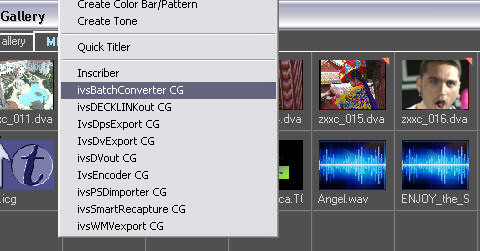
ivsRecode: a key tool that imports any DirectShow file (any file that Windows Media Player can read) into the .dps file format. Velocity has a similar tool, but ivsRecode (formerly ivsBatchConverter) is much faster (up to 30 times) and adds important image processing options such as aspect ratio changes (16:9 to 4:3 and vice versa), colour correction, image filtering (glow, blur, sharpen) and size conversion (any HD format to SD .dps).
ivsSmartRecapture: many advanced users considered batch recapture the weak point of Velocity. Starting from a Velocity timeline with real or virtual clips, this plug-in generates a new timeline and the related batch list to recapture the clips. To save time, it can generate multiple batch lists (for example split by tape) for simultaneous capture sessions with the Pro version of ivsCapture.
ivsDECKLINKout: outputs the Velocity timeline through an inexpensive SDI/analogue card such as the Blackmagic DeckLink, with additional real-time features: aspect ratio changes (16:9 to 4:3 and vice versa), colour correction, image filtering (glow, blur, sharpen) and broadcast upscaling (from SD to HD, without frame rate change).
ivsDPSexport: exporting DPS with the unify option requires extra time to render the real-time segments of the timeline. ivsDPSexport exports the timeline to a single .dva/.dps file in a single real-time pass, with high-quality processing such as aspect ratio changes (16:9 to 4:3 and vice versa), colour correction and image filtering (glow, blur, sharpen).
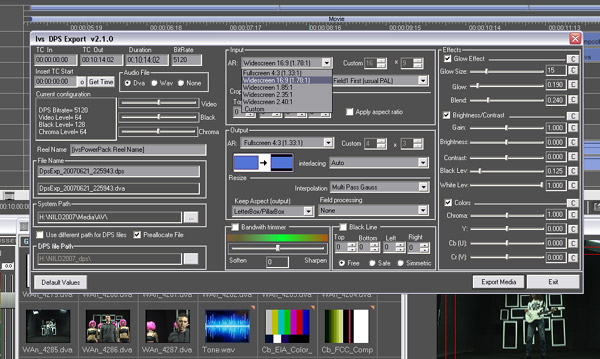
ivsDVexport: DV is one of the main exchange file formats. This plug-in lets Velocity export the timeline to a Microsoft DV AVI file in a single real-time pass, with the same high-quality processing options (aspect ratio changes, colour correction, glow/blur/sharpen filtering).
ivsDVout: the timeline can be output directly to DV tape with VTR controls (play, rewind, fast forward, etc.) or previewed on FireWire/i.LINK devices.
ivsCapture (formerly ivsEncoder): works both stand-alone and as an integrated part of Velocity NLE, capturing from a DirectShow device (FireWire OHCI or, for example, an inexpensive SDI/analogue card) into the .dps/.dva file format. Non-linear editing was a great step forward, but linear editors always complained about the time wasted pre-recording: ivsCapture removes this waste by capturing into DPS format without stopping your editing, so you can edit the same clip you are capturing, without using your Reality, Quattrus or Altitude hardware.
The "Play and Edit While Rec" technology creates the .dps/.dva file as soon as you press Record, so the file can be added to the Velocity timeline and gallery immediately. At first all frames are black, then they are replaced in real time by the video source during capture.
The ivsCapture Pro version (optional upgrade) captures several video sources on the same workstation at the same time: a dual Xeon dual-core workstation could capture up to 6 sources. Combined with the Quattrus multicamera features, this allowed a VelocityQ or VelocityHD system to be used as a live broadcast video switcher, with all sources already recorded together with the editing decisions, making any further editing quick and easy. Other exclusive features:
- Captures to DPS from HD sources (HD-SDI or HDV FireWire)
- Splits clips automatically at scene changes (scene detection introduced in v2.5)
- Aspect ratio changes (16:9 to 4:3 and vice versa) during capture
- Broadcast video filters (blur, sharpen, glow) while capturing, with real-time adjustment and feedback
- Real-time colour correction (white and black levels, saturation, etc.) with real-time feedback
- Clip renaming after capture (both .dva and .dps)
- Audio volume adjustment, even from digital sources (FireWire and SDI)
- Bandwidth limiter to improve the quality of DVDs, MPEG-4 files and TV station playout
ivsPSDconverter: PSD files are a standard in the graphics industry but not in video applications. ivsPSDconverter adds them directly to the Velocity gallery (v8.x and 9.x) through a seamless import that preserves layers and transparency.
For anyone wanting to get the most from a Velocity system (Reality, Quattrus or Altitude), ivsPowerPack was an essential upgrade.
Versions and downloads
ivsPowerPack was commercial software; downloads were subject to the IVS software licence and reserved to registered IVS Forum users. User guides were available in English and Italian (PDF, 19 March 2007).