Esta es una página de archivo y se conserva como referencia. La versión actual de ivsEdit tiene su propia página. El contenido histórico está disponible solo en inglés.
Overview
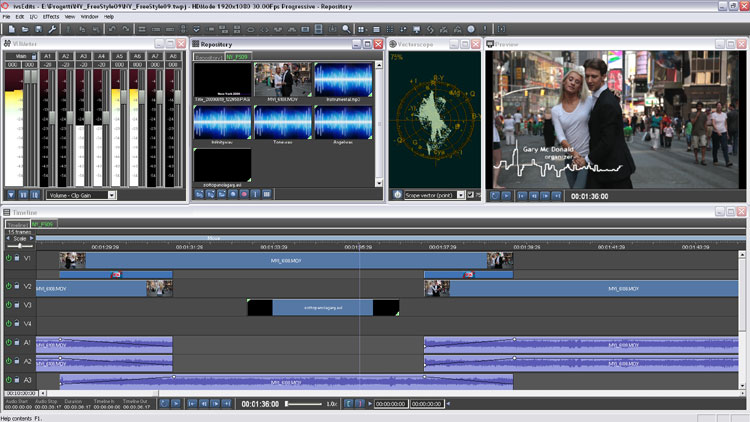
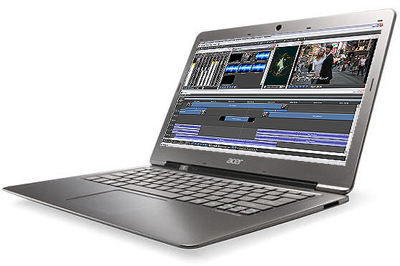
ivsEdits® is the modular and flexible non-linear editing software from IVS. It delivers a powerful and affordable 2K/HD/SD editing solution for any post-production or live production environment, bringing full-quality real-time editing performance everywhere, laptops included.
Features
Easy user interface and powerful editing toolset
The ivsEdits® user interface has a very short learning curve, with each tool set designed to require less time for the same task. The desktop layout can be user defined.
Multi-format timeline
The resolution-independent timeline lets you mix and match source material in a wide range of native SD, HD and 2K file formats such as DV, DVCPRO25/50, DVCPRO HD100, XDCAM SD/HD/EX, MPEG-1/2/4 and DPS/DVA, and supports the MXF, QuickTime, AVI and WMV containers.
Modular and open architecture
The architecture is modular, open and scalable: besides the traditional video and audio tracks, several types of timeline objects (special clips) can be added to handle external devices such as DMX lights, external VTRs or smoke machines. Syncing 256 light sources with video and music used to take days with other DMX controllers; with ivsEdits® it takes seconds. ivsEdits® also supports multiple virtual audio/video mixer objects, so timeline tracks can be mapped to different mixers and each mixer output sent to a different output device – useful to quickly edit and sync videos for museums, videowalls, stereoscopy or special events.
Collaborative workflow (some features optional)
Several users can work on a standard Gigabit LAN, sharing the same NAS storage without expensive options, working together on a single project with advanced tools such as multiple ingest and automatic clip collections. Additional ivsEdits® instances, on the same or other PCs, can be synchronised to play several different movies at the same time or in a scheduled sequence.
Multiple live inputs
Besides audio, video and graphics clips, the timeline accepts Live Clips coming from several simultaneous live inputs (depending on the installed input hardware). Live inputs can be SD or HD, analogue or digital, all on the same timeline.
Live multicamera editing
Designed around the needs of live event productions, Live Multicamera Editing captures and edits in real time the signals of up to 8 cameras, in the style of a live production switcher. When the event ends, the editor can make any adjustment and deliver the final product a few seconds after the show.
High-quality real-time video effects
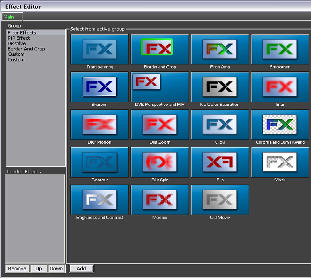
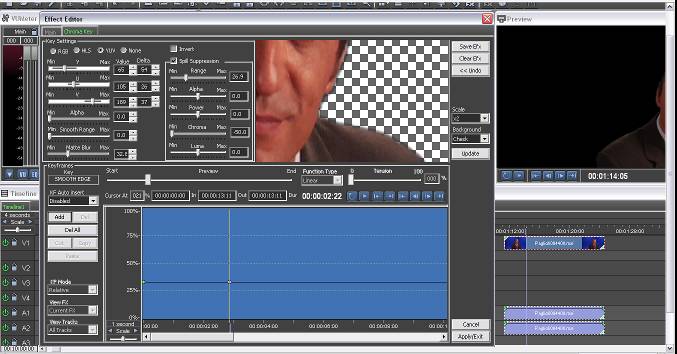
ivsEdits® supports the most common third-party transition and effect plug-ins and features its own high-quality effects, including chroma/luma keys, perspective, glow and blur, strobe, crop and borders, all with professional keyframing.
Faster-than-real-time import
Many formats are edited natively; when needed, any file can be imported to 4:2:2 I-frame formats several times faster than real time, depending on system performance. ivsEdits® takes great advantage of multi-core systems.
Faster-than-real-time export
Timelines can be exported faster than real time to many broadcast formats such as MPEG, MPEG-2, DPS, AVI, WMV and H.264 (MXF and QuickTime were announced as coming soon).
Play and Edit While Rec
Capture or import in the background and edit the very files being captured or converted: several videos can be used on the timeline less than a second after recording/conversion starts (multiple ingest requires an option). If time matters, ivsEdits saves a lot of it.
Real-time video I/O over standard OHCI IEEE 1394
Standard OHCI FireWire cards can be used for audio/video input and output, to print a timeline to tape or to get real-time feedback on an external device or video monitor.
Real-time audio/video I/O with third-party devices
ivsEdits® supports Blackmagic Design I/O devices: the whole DeckLink and Intensity board series and the Multibridge line, including the Intensity and UltraStudio USB 3.0 products.
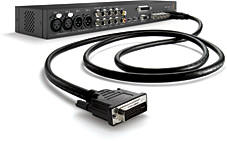
External or internal alpha key
Internal and external real-time alpha keying, depending on the Blackmagic DeckLink in use, turns the timeline into a powerful CG playout.
3D stereo support
Native support for the Side-by-Side and 3Dtile stereoscopic frame formats.
XML as interchange format (announced)
Timelines can be compiled in XML to exchange projects with NLEs from other manufacturers, or to build timelines with external tools – for example playlists and complex projects for live games (TV quizzes, etc.) or TV shows.
Velocity timeline and gallery compatibility (announced)
Import and export of Velocity timelines and galleries, allowing Velocity users to share projects between Velocity and ivsEdits.
Continuous updates
New releases were published for download on an ongoing basis: new features did not have to wait for the next major release.
ivsEdits® forum
On the IVS forums users could discuss ivsEdits®, Harris Velocity, ivsNewsManager, Fusion, operating systems and more, with support and moderation by the IVS team.
Hardware compatibility list (updated 1 September 2013)
Recommended motherboards and reference systems
In all configurations, on-board audio should be disabled in the BIOS when a DeckLink, Intensity or Multibridge device is installed.
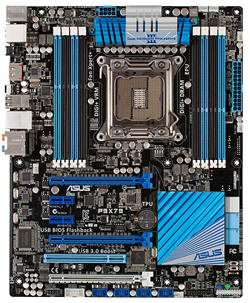
| Motherboard | Class | Platform | Reference configuration | Notes |
|---|
| ASUS P9X79 | RT HD multistream NLE | LGA2011, Intel X79; quad-channel DDR3 1866 (8 sockets); 2x SATA III + 4x SATA II; 4x USB 3.0, 14x USB 2.0; 1 FireWire; 1x PCI, 2x PCIe x16 + 1x PCIe x16 (x8 mode) + 2x PCIe x1 | Core i7 3930K, 8 GB RAM, Windows 7 64-bit, OCZ SSD boot drive; AMD/NVIDIA GPU or DeckLink Quad in PCIe x16 #1, DeckLink Studio/Intensity in the PCIe x1 slots, DeckLink or Promise EX8650 in PCIe x16 #3 | With quad-channel 2133 RAM, the fastest platform for ivsEdits: up to twice as fast as X58 and Z77. Supports Blackmagic USB 3.0 products without additional adapters (some problems on Windows shutdown if a program is still accessing the BMD USB 3.0 devices). |
| ASUS P8Z77-V LK | RT HD multistream NLE | LGA1155, Intel Z77; dual-channel DDR3 2133 (4 sockets); 2x SATA III / 4x SATA II; 2x PCI, 2x PCIe x16 3.0/2.0 (1x16 or dual x8), 1x PCIe x16 (x4 mode), 2x PCIe x1; 6x USB 3.0 (4 Intel, 2 ASMedia) | Core i7 3700K, 4/8 GB RAM, Windows 7 64-bit, OCZ SSD boot drive; Intensity Pro / DeckLink Studio / DeckLink HD; LaCie FireWire in PCI | Good base for real-time HD multistream editing, but fewer PCIe lanes than X79 or X58. Intel HD 3000/4000 GPUs need driver build 2800 or higher for the GPU-accelerated DVE engine; AMD and NVIDIA GPUs remain the optimal choice. Compatible with Blackmagic USB 3.0 products. |
| ASUS P8H67-V | RT HD multistream NLE | LGA1155, Intel H67; dual-channel DDR3 1333 (4 sockets); 1x ATA133 / 2x SATA III / 4x SATA II; 3x PCI, 1x PCIe x16 + 1x PCIe x16 (x4 mode) + 2x PCIe x1 | Core i7 2600K, 4/8 GB RAM, Windows 7 64-bit, OCZ SSD boot drive; AMD/NVIDIA GPU, DeckLink HD; LaCie FireWire in PCI | Good base for real-time HD multistream editing, but fewer PCIe lanes than X58. Intel HD 3000 needs driver build 2509 for the GPU-accelerated DVE engine; AMD and NVIDIA GPUs remain the optimal choice. Not compatible with Blackmagic USB 3.0 products. |
| ASUS P6TD Deluxe | RT HD multistream NLE | LGA1336, Intel X58 + ICH10R; triple-channel DDR3 1333 (6 sockets); 1x ATA133 / 6x SATA / 1x eSATA; 2x Gigabit LAN; 2x IEEE 1394; 2x PCI, 3x PCIe x16 + 1x PCIe x4 | Core i7 980X, 6/12 GB RAM, Windows 7 64-bit; NVIDIA GPU; DeckLink HD / Promise EX8650 in PCIe x16 #2–#3; video storage 8 SATA drives in RAID 6 on EX8650 | Optimal system for real-time HD multistream editing, twice as fast as any dual quad-core Xeon 54xx platform. Supports multiple PCIe Blackmagic devices. |
| ASUS P6T Deluxe V2 | RT HD multistream NLE | LGA1336, Intel X58 + ICH10R; triple-channel DDR3 1333 (6 sockets); 1x ATA133 / 6x SATA / 1x eSATA / 2x SAS; 2x Gigabit LAN; 2x IEEE 1394; 2x PCI, 3x PCIe x16 + 1x PCIe x4 | Core i7 975, 6/12 GB RAM, Windows 7 64-bit; NVIDIA GPU; DeckLink HD / Promise EX8650; RAID 6 video storage | Optimal system for real-time HD multistream editing. Supports multiple PCIe Blackmagic devices. |
| ASUS P6T Deluxe | RT HD multistream NLE | Same platform as the P6T Deluxe V2 (X58, triple-channel DDR3 1333, 2x SAS, 2x IEEE 1394, 3x PCIe x16 + 1x PCIe x4) | Core i7 975, 6/12 GB RAM, Windows 7 64-bit; NVIDIA GPU; DeckLink HD / Promise EX8650; RAID 6 video storage | Optimal system for real-time HD multistream editing. Supports multiple PCIe Blackmagic devices. |
| Supermicro X8SAX | RT HD multistream NLE | LGA1336, Intel X58 + ICH10R; triple-channel DDR3 1333 (6 sockets); 6x SATA; 2x Gigabit LAN; 2x IEEE 1394 (brackets not included); 2x PCI-X 64-bit, 2x PCIe x16, 1x PCIe x4 (in x8 slot) | Core i7 975, 6/12 GB RAM, Windows 7 64-bit; NVIDIA GPU; DeckLink HD / Promise EX8650; LaCie FireWire in PCI/PCI-X; RAID 6 video storage | Optimal system for real-time HD multistream editing, twice as fast as any dual quad-core Xeon 54xx platform. |
| ASUS P5Q PRO | RT SD multistream NLE | LGA775 (Core 2 Duo/Quad, Pentium D/4), Intel P45 + ICH10R; dual-channel DDR2 (4 sockets); 1x ATA133 / 6x SATA / 2x SATA RAID; 2x IEEE 1394; 2x PCI, 2x PCIe x16 + 3x PCIe x1 | BIOS 1406, Core 2 Quad QX6600, 1 GB RAM; NVIDIA GPU; DeckLink HD Extreme in the second PCIe x16 slot; Reality and SDI/SDV/DVI-50x0 in PCI; video storage 4 SATA drives in RAID 0 | On-board audio disabled. Multiple PCIe Blackmagic devices are not supported. |
| ASUS P5K | RT SD multistream NLE | LGA775 (Core 2 Duo/Quad, Pentium D/4), Intel P35 + ICH9; dual-channel DDR2 (4 sockets); 1x ATA133 / 4+1 SATA / 1x eSATA; IEEE 1394 (TI); 3x PCI, 1x PCIe x16 + 1x PCIe x4 + 1x PCIe x1 | BIOS 0304/0410/0504, Core 2 Quad QX6600, 1 GB RAM; NVIDIA GPU; DeckLink HD Extreme in PCIe x4; SDI/SDV/DVI-50x0, Reality/Quattrus and LaCie IEEE 1394 in PCI; video storage 3 SATA drives in RAID 0 | On-board audio disabled. Multiple PCIe Blackmagic devices are not supported. |
Recommended chassis: Supermicro SC743TQ (tower / 4U)
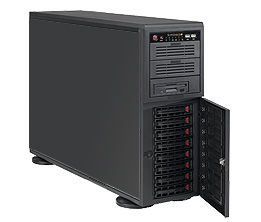
The SC743 is designed with 100% cooling redundancy through its high-performance fans and air shroud, reducing the risk of degraded performance due to thermal issues. Thanks to its 90-degree rotatable 5.25" drive bays it can be used as a rack-mount or tower system.
- Tower / 4U, E-ATX format
- 8x 3.5" hot-swap bays with SATA/SAS backplane
- 3x 5.25" bays
More info
Recommended I/O boards
| Device | Video | Audio | Interface | Link |
|---|
| Blackmagic Design DeckLink Studio | SD/HD-SDI; PAL/NTSC YUV/S-Video/composite; HDMI I/O; SD/720p/1080i/1080psf | 16 ch 24-bit SDI, AES/EBU, 2 XLR analogue | PCIe x1 | More info |
| Blackmagic Design DeckLink HD Extreme | SD/HD-SDI single/dual link 4:4:4 3 Gb/s; PAL/NTSC YUV/S-Video/composite; HDMI I/O; SD/720p/1080i/1080psf/2K | 16 ch 24-bit SDI, AES/EBU, 2 XLR analogue | PCIe x4 | More info |
| Blackmagic Design Multibridge Eclipse | SD/HD-SDI single/dual link 4:4:4 3 Gb/s; SD/720p/1080i/1080psf/2K; PAL/NTSC YUV/S-Video/composite; HDMI I/O | 16 ch 24-bit SDI, 6 AES/EBU, 4 XLR analogue | PCIe x4 | More info |
| Blackmagic Design Multibridge Pro | SD/HD-SDI single/dual link 4:4:4 3 Gb/s; PAL/NTSC YUV/S-Video/composite; HDMI I/O; SD/720p/1080i/1080psf/2K | 16 ch 24-bit SDI, 4 AES/EBU, 2 XLR analogue | PCIe x4 | More info |
| Blackmagic Design Intensity Pro | NTSC/PAL/720p/1080i; YUV/S-Video/composite; HDMI I/O | – | PCIe x1 | More info |
| Blackmagic Design Intensity Shuttle | NTSC/PAL/720p/1080i; YUV/S-Video/composite; HDMI I/O | – | USB 3.0 | More info |
| Blackmagic Design UltraStudio Pro | NTSC/PAL/720p/1080i/1080p; YUV/S-Video/composite; 2x SDI out, 1x SDI in; HDMI I/O | – | USB 3.0 | More info |
| Blackmagic Design DeckLink Quad | NTSC/PAL/720p/1080i/1080p; 4x SDI | – | PCIe x4 | |
| Blackmagic Design DeckLink 4K | NTSC/PAL/720p/1080i/1080p/2K/4K; 4x SDI | – | PCIe x4 | |
Recommended RAID adapter
Promise SuperTrak EX8650: 8 SAS/SATA ports, RAID 0, 1, 0+1, 5, 50, 6, 60; requires a PCIe x8 slot.
Graphics cards
Results measured with the ivsGPUSpeedtester tool (HD frames per second).
| GPU | Status | ivsGPUSpeedtester (HD fps) | Notes |
|---|
| AMD Radeon HD 7770 / 7850 / 7870 / 7950 / 7970 | Recommended | 150–180 | Tested with X79 chipset and Core i7 3930 |
| AMD Radeon HD 6850 / 6870 / 6950 / 6970 | Recommended | 140–160 | |
| NVIDIA GeForce GTS 250 | Recommended | 140–160 | |
| NVIDIA GeForce GTX 260 / 275 / 280 / 285 | Recommended | 150–165 | |
| NVIDIA GeForce GTX 460 / 470 / 480 / 560 / 570 / 580 | Compatible | 90–100 | |
| NVIDIA GeForce GT 220 / 240 / 8600 | Compatible | 110–120 | |
| NVIDIA GeForce 8400 / 8500 / 9400 / 9500 | Compatible | 80–90 | |
| Intel HD 3000 | Compatible | 50–65 | Only with Intel HD 3000 driver 15.26.5.64.2656 |
Recommended laptops
| Laptop | Class | Specifications |
|---|
| Dell Vostro 3560 | RT SD multistream – RT HD dual stream | Core i7 3632QM 2.1–3.0 GHz; Windows 8 Pro 64-bit; Intel HD 4000 + AMD 7670 GPUs; 15.6" 1920x1080 LED display; dual-channel DDR3 1600; Gigabit LAN; 1 ExpressCard slot; 4x USB 3.0 |
| Acer AS8951G | RT SD multistream – RT HD dual stream | Core i7 2630QM, Intel H65; Intel HD 3000 + NVIDIA GT 555 GPUs (only with Intel HD 3000 driver 15.26.5.64.2656); 18.4" 1920x1080 LED display; DDR3 1333; 2 internal SATA drives + eSATA/USB 2.0; Gigabit LAN; IEEE 1394 (DV/HDV); 2x USB 2.0 + 1x USB 3.0 |
| Acer AS5951G | RT SD multistream – RT HD dual stream | Core i7 2630QM, Intel H65; Intel HD 3000 + NVIDIA GT 555 GPUs (only with Intel HD 3000 driver 15.26.5.64.2656); 15.6" 1366x768 LED display; DDR3 1333; 1 internal SATA drive + eSATA/USB 2.0; Gigabit LAN; IEEE 1394 (DV/HDV); 2x USB 2.0 + 1x USB 3.0 |
Versions and downloads